

WordPress File Upload Types: SVG, AVIF, HEIC, WOFF and More
WordPress file upload types cover images, documents, audio, and video by default — but the platform blocks SVG, AVIF, HEIC, WOFF fonts, and 3D model files entirely. For many websites, this limitation creates unnecessary friction. Fortunately, TheOneWP includes a File Upload Types module that unlocks these additional formats safely, with per-format control and role-based permissions built on WordPress’s native upload system.
Why WordPress Blocks Certain File Upload Types by Default
WordPress restricts file upload types as a security measure. For example, SVG files can contain embedded JavaScript, and allowing unrestricted uploads from any user role creates a real attack surface. Moreover, other formats — such as AVIF and HEIC — are simply newer than WordPress’s default MIME type list, and WordPress has not yet added them to the core allowlist.
As a result, site owners regularly need to upload files that WordPress refuses to accept. Typically, the workarounds involve editing functions.php, installing a single-purpose plugin, or asking a developer to add a filter. TheOneWP removes that friction entirely from the WordPress Media Library settings panel.
Supported WordPress File Upload Types
The File Upload Types module currently supports five format groups. Furthermore, each one is independently toggleable, so you only enable what your workflow actually requires.
SVG — Scalable Vector Graphics
SVG files are the most common addition people request for WordPress file upload types. Logos, icons, and illustrations in SVG format are resolution-independent and significantly smaller than equivalent PNG or WebP files. However, because SVG is an XML-based format that can contain scripts, TheOneWP automatically sanitizes every SVG on upload: the module strips dangerous elements and attributes before saving the file, making SVG uploads safe without exposing the site to script injection.
AVIF — Next-Generation Image Format
AVIF offers superior compression compared to JPEG and WebP while maintaining high visual quality. In addition, modern browsers increasingly support it, making it particularly useful for performance-focused websites. Enabling AVIF lets you serve next-gen images directly from the media library without additional conversion tools.
HEIC / HEIF — iOS and macOS Photos
HEIC and HEIF are the default photo formats on iPhones and Macs. Without this upload type enabled, users must convert their photos before uploading — an unnecessary extra step. Instead, enabling this format allows direct uploads from Apple devices. Note that thumbnail generation requires server-side HEIF support, which TheOneWP checks and reports in the settings panel.
WOFF / WOFF2 — Web Fonts
Self-hosting web fonts improves performance and privacy by eliminating third-party font requests. Specifically, WOFF and WOFF2 are the standard web font formats. Enabling them lets you store custom fonts directly in the media library and reference them from your theme or custom CSS.
OBJ — 3D Model Files
The Wavefront OBJ format is widely used for 3D models in product pages, interactive experiences, and design portfolios. WordPress blocks OBJ uploads by default; however, TheOneWP enables them using the model/obj MIME type, so you can store and serve 3D assets from the media library like any other file.
How to Configure WordPress File Upload Types in TheOneWP
The entire setup takes under a minute. Here is how to do it.
Step 1: Open the Content Tab
First, go to TheOneWP in your WordPress admin sidebar. Then click the Content tab at the top of the settings page. You will find the File Upload Types module listed there.
Step 2: Activate the Module
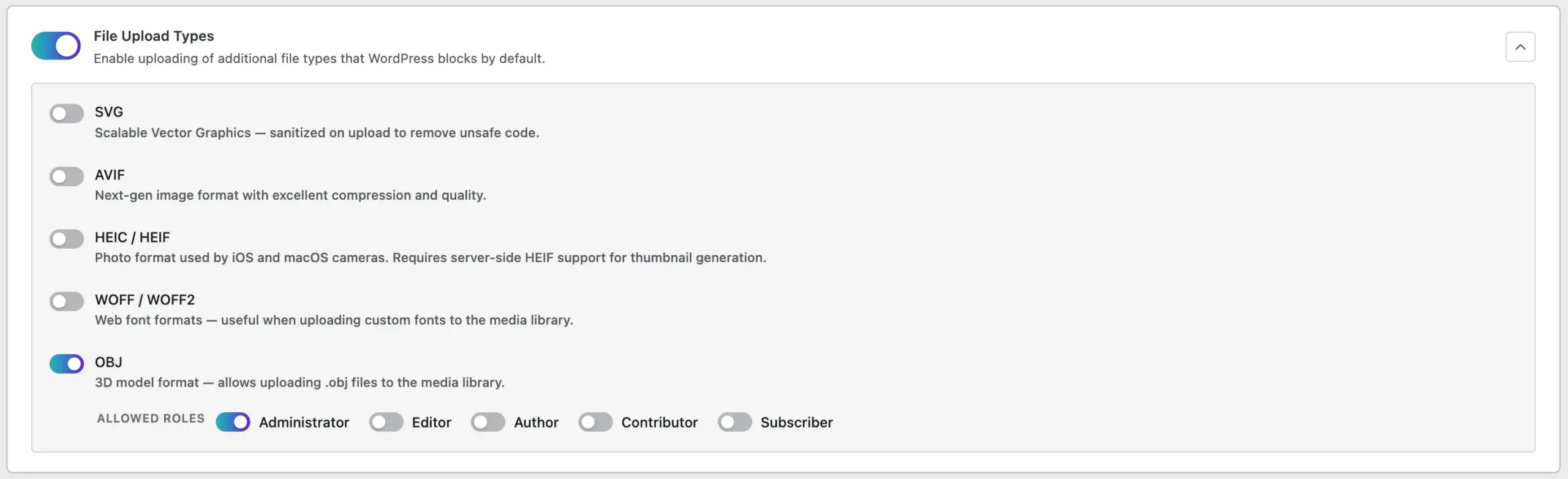
Next, click the toggle next to File Upload Types to enable it. The module panel expands immediately to show all supported formats.
Step 3: Select Your WordPress File Upload Types
Check the formats you want to allow. Each format is independent — for instance, you can enable SVG without enabling AVIF, or enable WOFF without enabling OBJ. TheOneWP only unlocks the formats you explicitly check.
Step 4: Restrict by User Role (Optional)
For each enabled format, you can optionally restrict uploads to specific user roles. For example:
- Allow SVG only for Administrators and Editors, not Contributors.
- Allow WOFF only for Administrators.
- Leave roles unchecked to allow all users to upload that format.
This role-based control is particularly important for SVG. Specifically, allowing untrusted users to upload files — even sanitized ones — may not suit every editorial workflow.
Step 5: Save
Finally, click Save Changes. TheOneWP unlocks the selected WordPress file upload types immediately in the Media Library, with no server restart or cache clearing required.
SVG Security in WordPress File Upload Types
SVG sanitization is one of the most important aspects of this module. When a user uploads an SVG file, TheOneWP processes it through a sanitization routine before writing it to disk. Specifically, the process works as follows:
- The module parses the file as XML.
- The sanitizer keeps only elements from a strict allowlist and removes all others.
- The sanitizer also strips dangerous attributes such as
onload,onclick,javascript:references, and external resource calls. - If the module cannot parse or sanitize the file, it rejects the upload entirely.
Furthermore, TheOneWP intentionally does not support gzip-compressed SVG files (.svgz), because the module cannot safely sanitize them before decompression.
Common Use Cases for Extended WordPress File Upload Types
In practice, enabling additional file upload types benefits a wide range of site types:
- Design agencies and portfolios — upload SVG logos and vector illustrations directly to client sites.
- Performance-focused blogs — serve AVIF images for faster page loads without external conversion tools.
- Photography sites with Apple devices — accept HEIC uploads directly from iPhones and Macs.
- Custom-branded sites — self-host WOFF and WOFF2 font files from the media library.
- E-commerce and product sites — store OBJ files for 3D product previews and interactive viewers.
Why Handle WordPress File Upload Types Without an Extra Plugin
Dedicated plugins exist for SVG uploads, AVIF support, and font management. Each one works well; however, each one adds another dependency to your site. With TheOneWP, by contrast, you manage all these WordPress file upload types from a single module inside a system you already have installed. Enable what you need and disable what you do not — no additional plugins, no additional maintenance.
Final Thought on WordPress File Upload Types
WordPress’s default restrictions on file upload types exist for good reasons. Nevertheless, they should not get in the way of legitimate workflows. The File Upload Types module in TheOneWP gives you precise control over which formats to allow, which roles can upload them, and — in the case of SVG — how the module sanitizes them before writing anything to your server. Practical, secure, and entirely contained within one settings toggle.