

External Links WordPress Plugin for Safer Outbound Links
An external links WordPress plugin helps you control how outbound links behave across your website. Although managing external links may seem trivial, every link to a source, partner, or reference can affect user experience, website security, and SEO control. With TheOneWP, this process becomes automatic: no code, no manual editing, and no extra plugins to install.
What the External Links WordPress Plugin Does
Inside your post content, TheOneWP’s External Links module automatically detects every link that points to an external domain. Once it finds one, the module applies two useful changes:
- The link is set to open in a new browser tab with
target="_blank". - Each link receives configurable
relattributes. By default, these are:rel="noopener noreferrer nofollow".
Why Use an External Links WordPress Plugin for New Tabs?
When a visitor clicks an external link, they usually leave your website. However, opening external links in a new tab allows visitors to explore the external resource without losing the page they were reading. According to Nielsen Norman Group’s research on external links and new browser windows, this pattern is particularly useful for reference-heavy content where users need to compare information across multiple sources.
Therefore, this small change can improve the reading experience. It is not dramatic, obviously. Still, small details often separate a polished website from a digital drawer full of forgotten plugins and broken intentions.
External Links WordPress Plugin Security Settings
When a link opens in a new tab using target="_blank", the new page may access the original page through the browser’s window.opener property. This is a documented security issue. For this reason, MDN Web Docs explains the noopener attribute as an important protection. In short, without it, a compromised external page could potentially redirect your site.
noopener: prevents the new tab from accessing the opener window.noreferrer: prevents the browser from sending referral information to the destination site.
As a result, your external links become cleaner, safer, and less likely to create pointless security nonsense.
External Links WordPress Plugin SEO Settings
Using the nofollow attribute tells search engines not to pass SEO authority through that link. In addition, Google’s guidelines on qualifying outbound links recommend it for links to third-party websites you do not fully control, sponsored content, or external references where you prefer not to transfer ranking value.
This external links WordPress plugin applies nofollow automatically to all detected external links. As a result, you get consistent SEO control without editing individual links manually.
How to Configure the External Links WordPress Plugin in TheOneWP
Getting started takes less than a minute. Here is everything you need to know.
Step 1: Open the Content Tab
In your WordPress admin area, go to TheOneWP in the left sidebar. Then, click the Content tab at the top of the settings page. You will find the External Links module listed there.
Step 2: Activate the Module
Click the toggle next to External Links to enable it. After that, the module panel expands and shows all available options.
Step 3: Choose Post Types
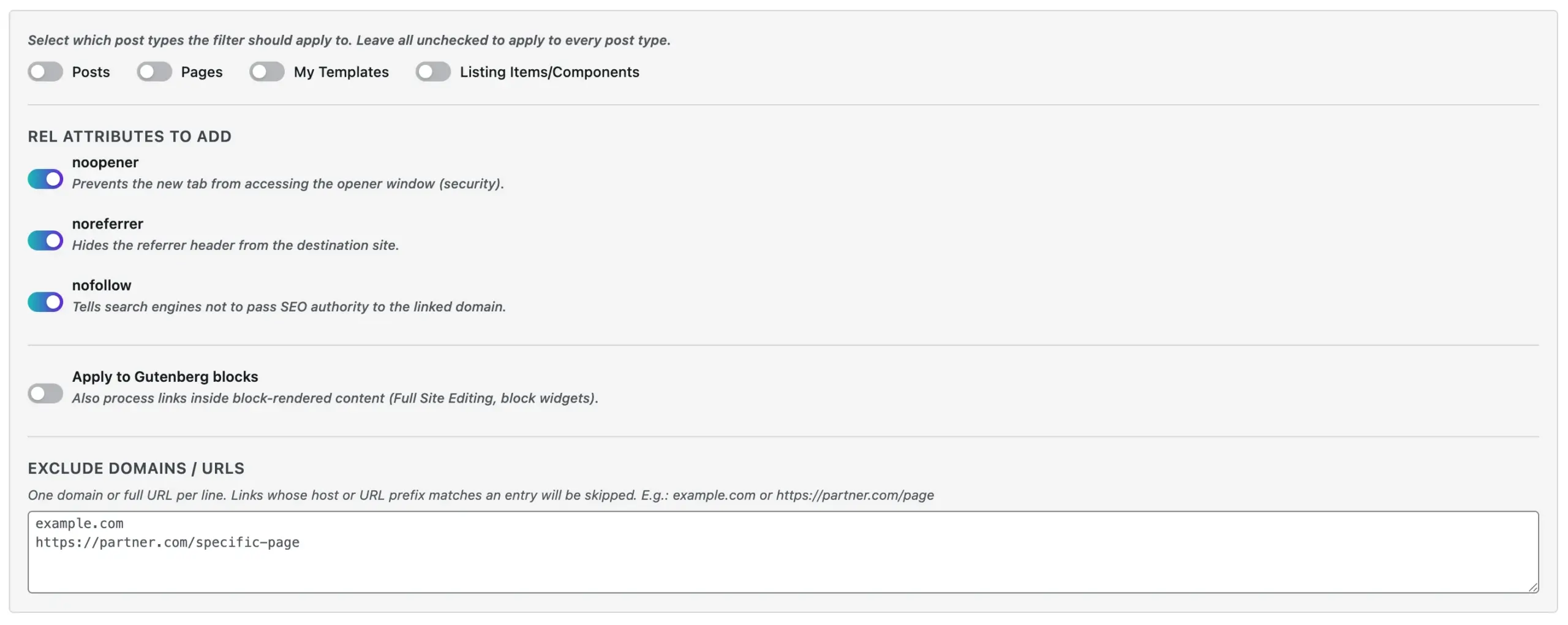
By default, when no post type is selected, the module applies to all post types: posts, pages, and custom post types. However, if you want to limit it to specific content, check only the post types you need.
Step 4: Configure the rel Attributes
Under rel attributes to add, you will find three individual toggles:
- noopener: adds
rel="noopener"and prevents the new tab from accessing your page throughwindow.opener. - noreferrer: adds
rel="noreferrer"and hides the referrer header from the destination site. - nofollow: adds
rel="nofollow"and tells search engines not to pass SEO authority to the linked domain.
All three are enabled by default. However, you can disable any attribute individually. For example, if you prefer to pass link authority to trusted partner sites, use the exclusion list to skip those domains entirely.
Step 5: Apply to Gutenberg Blocks
If your site uses the Block Editor, including Full Site Editing themes or block-based widgets, enable Apply to Gutenberg blocks. This option extends the external link processing to block-rendered content, which WordPress handles separately from classic post content.
Step 6: Exclude Specific Domains or URLs
Use the Exclude domains / URLs field to define exceptions. Then, enter one domain or full URL prefix per line:
example.com
https://partner-site.com
https://external-domain.com/specific-page
Links matching an entry in this list will be skipped entirely. Therefore, no target="_blank" or rel attributes will be added to those links.
Step 7: Save
Finally, click Save Changes. The module activates immediately across all published content matching your selected post types. In most cases, no cache clearing is required.
External Links WordPress Plugin Example Configuration
Suppose you run a business blog and regularly link to industry reports, partner tools, and reference articles. In that case, a sensible configuration for this WordPress plugin for external links would be:
- Post types: Posts only.
- noopener: On.
- noreferrer: On.
- nofollow: On.
- Gutenberg blocks: On.
- Excluded domains: Your own sister sites or trusted affiliate programs.
As a result, every external link in your blog posts opens in a new tab, passes no authority to third-party domains, and leaks no referrer data automatically. Better still, this applies to every matching post, both past and future.
Why This External Links WordPress Plugin Matters
This module is not a flashy feature. It will not spin a 3D cube, generate AI poetry, or pretend to reinvent the internet for the 47th time this week. Instead, the External Links module solves a real problem consistently.
It helps website owners:
- Keep visitors on their site longer.
- Improve external link security from new-tab vulnerabilities.
- Avoid passing unnecessary SEO authority to external domains.
- Protect visitor privacy by suppressing referrer data.
- Apply a consistent external link policy across all content, including content already published.
In addition, it does all of this automatically, with no manual editing of individual links. Humanity survives another repetitive task.
Built for Practical WordPress Management
TheOneWP is designed around a simple idea: WordPress websites should be easier to manage, optimize, and control. Instead of installing many small plugins for many small tasks, you can use one modular system with useful tools inside. Then, you activate only what you need.
For that reason, the External Links module is one of those features that quietly improves a website in the background. It stays simple, avoids complicated setup, and removes the need to hunt for yet another plugin.
Final Thought
External links are part of almost every website. However, managing them properly should not require manual work, extra plugins, or remembering technical attributes every time you publish content.
With TheOneWP, a complete external links WordPress plugin and much more, the entire process is automatic, configurable, and consistent. Often, the smartest features are not the loudest ones because they prevent problems before anyone notices them.